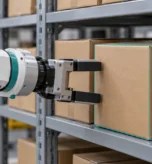

A robotics training dataset records what a robot sees and does as it carries out a task. For a warehouse picking robot, that means capturing how it locates a package and lifts it clear without disturbing the boxes around it.
An open shelf gives the robot’s two-finger gripper room to approach the package. When the same box is wedged between two others, the camera may still see the box even though it can’t see where the gripper needs to make contact. That difference should guide your data collection plan, because another recording of an easy pick tells the robot little about how to approach the wedged box.
In this article, we explain how to plan collection around the decisions your robot will face on the job and test how it handles them. Before you decide how to record a pick, define what the robot needs to do when the shelf is crowded and what counts as success.
What Should A Robotics Training Dataset Cover?

A successful pick ends with the right package on the conveyor and the boxes beside it still in place. If the warehouse stocks boxes close together, how many demonstrations show the gripper lifting a package clear of its neighbours? Hundreds of picks from open shelves can leave you with very few examples of that manoeuvre.
Once you find those picks, look at what the recordings actually capture. First-person footage can show how a worker angles a box out of a tight gap. To teach the gripper the same pick, map the worker’s movements to actions the gripper can perform and pair them with what the robot’s camera sees.
That pairing matters when a pick goes wrong, too. A clip that ends as the box slips can help you check whether the system spots a failed grasp. If you expect the robot to try again, capture how the gripper repositions and whether the second attempt works.
What will the robot face on the shelf that your recordings haven’t prepared it for? Use the answer to decide what the robot must be able to do and which demonstrations to collect first.
Building The Dataset Around A Single Pick

Start with one pick you want the robot to handle. Once you can describe what a good pick looks like on a crowded shelf, you can decide what to record and set up a test to see whether the robot has learned it.
1) Define the task and what counts as success
Write the task as you would explain it to the person running the trial. The two-finger gripper has to lift the target box onto the conveyor without damaging it or shifting its neighbours, so a box that reaches the belt after knocking another one aside still counts as a failed pick.
Use the same brief to agree on what the robot should do when a box slips or there’s too little room to grip it. That gives the collection team a consistent way to label the attempt and any recovery that follows.
2) Turn warehouse conditions into a collection plan
Turn that brief into a coverage matrix with a row for each picking condition worth recording. For a box wedged between two others, note what the robot needs to see as it approaches and which gripper movements you need to capture. You can then count usable demonstrations against the specific pick they represent.
Give common shelf arrangements priority, then make room for less frequent cases where a bad pick could damage stock or stop the line. If tightly packed shelves are routine, another demonstration of that pick is worth collecting before you work through every combination of box size and shelf height.
3) Choose a data source for the behaviour you need
The matrix also helps you choose how to capture each pick. If the robot needs to recognise packages from different angles, first-person video can show how they look as a worker reaches into the shelf. To teach the gripper how to move through the same space, have an operator guide the robot and record the commands alongside its sensor readings.
Simulation lets you vary the box position or grip without resetting the shelf between attempts, although a box that holds in simulation may slip on the physical robot if the friction differs. Check the hardware behind public datasets for a similar reason. A demonstration recorded with a suction gripper may help the robot recognise the box while telling it little about where its two fingers should make contact.
4) Check a small batch before scaling collection
Before commissioning a larger batch, replay a few picks through the training pipeline and pause as the gripper closes. Does the paired camera image show where the box was at that moment? A timing error can make the closing command look like a response to a position the box has already moved from.
While you have the recording open, check whether the outcome label matches what happened and whether the data loader in your training pipeline reads the timestamps and action units correctly. Resolve missing or unreadable records before collecting at scale, then log the dataset version with each training run so you can trace later changes in performance.
5) Test the robot on conditions it hasn’t seen
Set aside some shelf arrangements before training and keep every attempt from those arrangements out of the training set. That way, when you run the trained robot on the physical shelf, a near-identical pick from the same setup won’t already be in its training data.
Report success for each picking condition alongside the overall rate. If open shelves make up most of the trials, the headline figure can look healthy even when the robot keeps missing boxes on crowded shelves.
6) Collect the next batch against diagnosed failures
When the gripper keeps missing a wedged box, replay the camera feed alongside the commands and check whether the training set covered that shelf arrangement. An unfamiliar setup gives you a specific pick to collect. If the setup is familiar, open the training recordings for it and check that the frames line up with the commands, since a lag there points to a timing problem in the data.
If the recordings line up and the setup is represented in training, look at the approach the model chose. A workable command that still ends in a miss gives you a reason to inspect how the controller executed it before ordering another batch.
Running that check on one task during a pilot lets you fix the source of the miss before committing to a larger collection.
Start With A Focused Robotics Dataset Pilot
Bring one task to the pilot that your team can run and score on the physical robot. For the warehouse pick, agree on which shelf arrangements to record and which to reserve for testing. A small batch lets you check whether the recordings are usable before the team repeats the same setup at scale.
Decide what would justify a larger collection before you start. If the robot handles open shelves but still misses tightly packed boxes, use the trial recordings to see whether the next batch needs more examples of that pick or whether the capture setup needs work.
Scope a pilot with Aya Data to define your collection requirements and validate a focused robotics dataset before scaling.
Frequently Asked Questions
What should a robotics training dataset contain?
For a task the robot learns from demonstrations, pair observations such as camera footage with the actions the robot took at the time. Add enough task and outcome information to tell whether the attempt succeeded and whether a recovery worked.
How many demonstrations does a robot need for training?
There’s no fixed number, because it depends on how much the task varies from one pick to the next. Start with a batch you can review by picking conditions. If you have plenty of easy picks and only a handful from crowded shelves, collect more of the latter and use held-out trials to see whether performance improves.
Can human videos be used to train robots?
Yes. First-person footage can show how a person approaches an object and moves it through a tight space. To use those demonstrations to teach robot movements, you need to map what the person did to actions the robot can perform.
Should failed attempts be included in a robotics dataset?
Include them when they serve a specific purpose. A labelled slip can help you test whether the system detects a failed grasp, while a recording that continues through a second attempt can show how to recover.
Can you reuse a dataset collected on a different robot?
Check which parts of the original task transfer to your robot. Footage from a robot with a suction gripper may help with package recognition, but teaching a two-finger gripper to pick the same box requires examples that account for where its fingers make contact.
How can you tell whether a robotics dataset is good enough?
Test the trained robot against the success criteria you set before collection using shelf arrangements you held back from training. Review the results by condition to see whether the robot handles difficult picks as consistently as routine ones.